
View Orders with Outstanding Tasks
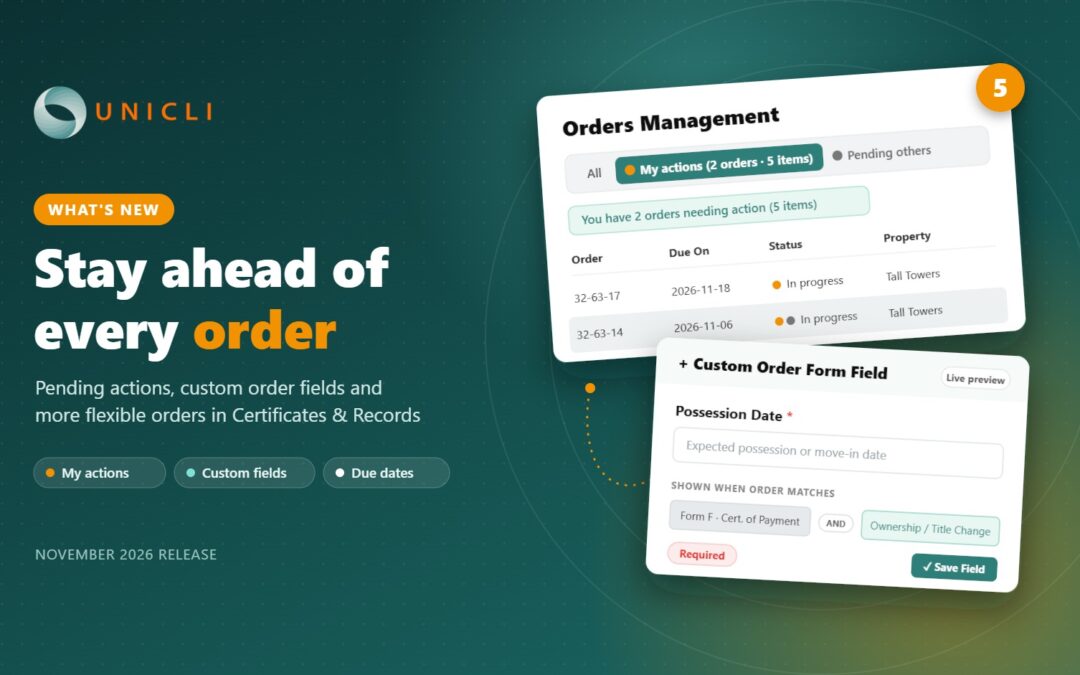
You can now see which in-progress orders still have outstanding tasks, and who they are waiting on. Orders remain In Progress until their completion date for both the requester and the preparer.
A preparer may have everything ready and simply be waiting to deliver on the due date, which previously meant opening every in-progress order to confirm nothing was left to do. Orders can now be filtered by outstanding tasks for the preparer, or another party, with the remaining tasks for each order shown at a glance. Simply open the orders that need your attention and complete your own tasks, saving time and reducing the risk of missed steps.
Custom Fields on the Order Form
We have introduced the ability to add custom fields to the form requesters complete when ordering records. Fields can be linked to one or more products and to the order purpose.
For example, when an order is placed for a change of title and includes a Form F, a specific field can be required. Custom fields are text fields configured at the organization level, and there is no limit to how many you can add. Once an order is created, each field and its value appear in the order’s Information and History section under Additional Information.
Change the Order Due Date
Property managers can now change the due date of an existing order. Because a new due date can affect expedited fees, you choose how fees are handled each time:
- Leave fees unchanged – expedited fees remain as originally calculated.
- Recalculate from the order start date – fees are calculated as if the order had been placed with the new due date from the start.
- Recalculate from the date of the change – fees are calculated from the day the due date is changed. For example, if a Form B is needed sooner partway through an order, the maximum expedited fee can be applied.
This gives you the flexibility to reflect what was agreed with the requester while keeping billing accurate.
Remove Items from an Order
You can now remove individual items from an order without cancelling the entire order. Removed items no longer appear on the order and are excluded from the final release. The order total is recalculated automatically, keeping billing accurate and avoiding the need to cancel and resubmit orders.
Easier Record Selection for Requesters
Requesters can now more easily select records and make changes to their selection throughout the order process. Available records can be added or removed at any time until the order is delivered.
This helps ensure requesters have access to the latest documents, and anything that is no longer needed can simply be removed.
Thank You
We appreciate the valuable feedback from our customers, which continues to shape the evolution of Unicli. In developing these features, we worked closely with clients to understand where outstanding work was getting lost and where orders needed more flexibility after they were submitted. The result is a set of practical tools that give you clearer visibility and more control over every order. We remain committed to building solutions that address real operational challenges, and we encourage you to continue sharing your ideas and feedback as Unicli evolves.
Continuous Improvements
Alongside the major enhancements, we’ve made many other refinements, performance boosts, and usability improvements. These subtle changes ensure a smoother, faster, and more reliable user experience. We remain committed to continuously optimizing Unicli to better serve your needs.
About Unicli Inc.
Unicli Inc. aims to pioneer a new era of property management excellence by enhancing communication through AI, where every interaction is meaningful, every process is optimized, and every community thrives. At the heart of our mission is the belief that effective communication is the cornerstone of property management excellence. Unicli strives to empower property managers with cutting-edge intuitive technology that simplifies communication processes, enabling exceptional service and building lasting relationships.